Praktika Review: Is It Worth It In 2026?
The Bottom Line
Praktika is one of the more polished AI language learning apps available, offering structured lessons, realistic speaking practice, and an attractive interface. Its guided conversation approach makes it a strong choice for beginners and lower-intermediate learners building confidence.
However, the learning path system is rigid and feedback is limited. Customization options fall short of what advanced learners may expect.
The avatars are central to the experience but can be distracting, with no audio-only option. There's less flexibility than competitors when it comes to voice selection, custom lessons, and grammar support.
Praktika works well for learners who want simple structured practice. But if you're looking for a more flexible tool that enables personalized speaking practice and detailed feedback to help you improve, you may find Langua to be more suitable.
Overall rating: ⭐⭐⭐ 3 stars out of 5.
In-Depth Praktika Review
Below you’ll find a detailed look at Praktika’s performance across the core areas that matter most: conversation quality, lesson structure, speech recognition, feedback, vocabulary tools, and grammar support.
But before the full Praktika review, here’s a quick overview of the app’s strengths and weaknesses.
Praktika Pros & Cons
Pros
- Natural-feeling conversations, especially at intermediate levels.
- Clean, intuitive interface with well-organized lesson paths.
- Beginner lessons include helpful scaffolding and guided questioning.
- Large number of conversation topics to practice on demand.
Cons
- Learning paths are rigid, and changing them resets your progress.
- Feedback is limited and easy to miss in the flow of conversation.
- Avatars can be distracting or uncanny, with no option for audio‑only.
- No spaced repetition or long-term tracking of saved vocabulary.
- Limited custom lesson options compared to competitors.
Conversation Quality & AI Intelligence
Praktika focuses on speaking. Every lesson revolves around guided conversation with an animated AI avatar, and the app does a solid job of adapting the difficulty of questions to your level.
When testing the app in Spanish (beginner) and French (intermediate), I found that:
- Beginner chats rely heavily on English, asking simple prompts and encouraging you to guess meanings from context.
- Intermediate chats are fully immersive, conducted entirely in the target language.
Praktika frequently prompts learners to make educated guesses: "What do you think this word means?" or "Does this expression sound formal or informal?"
This can be a very effective strategy, but it works best when the app provides enough context, which is where Praktika sometimes falls short. Sometimes I was left confused as far too little information had been provided.
The AI does well at keeping the conversation going, especially at the B1 level. It rarely gets derailed and seldom misunderstands a response. That said, it isn’t as flexible or human-like as another AI app, Langua. Custom prompts are limited to predefined roles and situations, and if you try to drift off script, the AI often guides the conversation back toward the lesson’s objective.
Feedback Quality & Depth
This is one of Praktika’s weaker areas. During a chat, each line you speak appears with a small “Feedback” button beside it. Tapping this reveals corrections or suggestions.
But there are two issues:
- The button appears even when you haven’t made a mistake, so you must tap it constantly or risk missing errors.
- There is no end‑of‑lesson feedback summary.
If you forget to check your transcript afterward, you may never see the corrections at all.
Unlike Speak or Langua, Praktika offers no post‑lesson breakdown, no categorized error list, and no follow‑up review exercises. Errors don’t influence future lessons, and the review system plays no role in long‑term progress. For learners who want detailed guidance, this can be frustrating.
Audio Quality, Avatars & Speech Recognition
Unlike apps that let you choose a voice, Praktika has you choose an avatar. In both French and Spanish, seven avatars were available, each with a slightly different voice and personality. Some are well-designed and pleasant to interact with, while others (such as the “Shadow” avatar) feel like novelties.
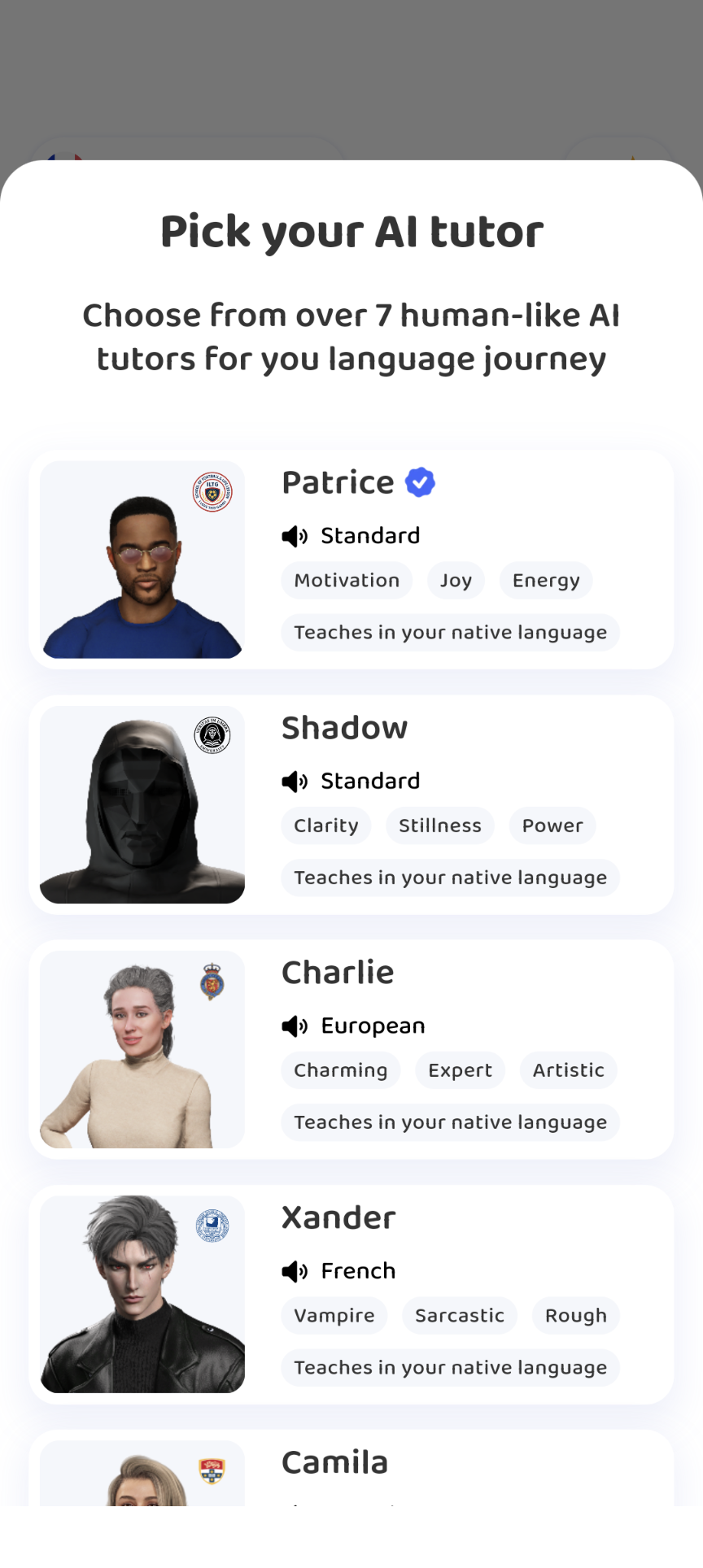
The avatars are fully animated and appear at the top of every chat. In theory, this is meant to simulate video conversation. In practice, the animations can be distracting: the facial expressions occasionally fall into the uncanny valley, whilst mouth movements are not perfectly synced to speech.
You can minimize the avatar to a small floating box, which helps, but there’s no way to disable it entirely.
Speech recognition is decent but can be too forgiving. The app does a good job interpreting partial sentences or self‑corrections, similar to a human tutor. However, it won’t reliably catch subtle grammar or word‑order mistakes unless they significantly disrupt meaning.
Structured Course & Learning Path Design
Praktika’s lesson structure is built around a detailed learning path, which you configure when you begin a new language. You choose:
- Daily study time.
- A goal (such as Travel, Living Abroad, Career Growth).
- Skills related to that goal.
- CEFR level (A1–C1).
- Personal interests drawn from a preset list.
This creates a personalized course designed to target the scenarios most relevant to your needs. It’s a thoughtful system, but also a rigid one:
- You cannot mix skills from different goals. If you’re learning for both work and living abroad, you must choose one.
- Changing goals resets your progress, even though your past lessons remain in your history.
- Skill and interest lists are fixed. You can’t add custom categories.
Lesson titles are often vague (“Words to Know,” “Basic Sentences”), and you can’t preview the content until you open the lesson. Fortunately, you can skip ahead to later lessons, which gives you more variety and prevents the path from feeling too linear.

The Practice tab offers around 140 conversation topics, which is impressive, but the list contains some niche options that won’t appeal to everyone. If you want to practice a topic not on the list (e.g., martial arts or parenting), you’re limited to the basic Free Talk mode or a very constrained custom scenario.
Langua, by contrast, lets you specify detailed custom prompts for grammar study, debates, storytelling, and more.
Vocabulary Tools & Personal Dictionary
Praktika allows you to tap any word during a lesson to view its definition and add it to your personal dictionary. This is useful, but limited:
- There is no spaced repetition.
- You cannot review saved words outside of reading the dictionary list.
- Saved words never reappear integrated into later lessons or chats.
This makes Praktika’s vocabulary system much weaker than Langua’s, which incorporates saved words into future conversations and offers multiple review modes.
Grammar Support
In the last part of this Praktika review, I'll focus on the dedicated grammar lessons. As you'll see, these are limited in both scope and flexibility.
From time to time, the app will recommend a short grammar-focused lesson based on your current path. These usually take the form of guided examples and controlled practice around a specific structure, such as question formation or a particular verb tense. When they appear, they’re a helpful way to highlight patterns you’ve been seeing in conversation.
However, you have very little control over this side of the app:
- You can’t browse a full list of grammar topics or decide to focus on one you personally struggle with.
- You can’t request a grammar lesson on a topic that isn’t preconfigured in your learning path.
- Grammar lessons feel like occasional add-ons rather than an integrated system you can steer.
If you’re the type of learner who likes to target weaknesses (for example, if you know you need extra practice with object pronouns or the subjunctive), you may find this frustrating.
Pricing
Praktika offers a short free trial period, after which you can continue with either a 3‑month plan or an annual subscription. There’s no month‑to‑month option, which means the minimum commitment is fairly high compared to other language apps. The pricing seems to vary by country.
All core features, including avatars, learning paths, and the full library of conversation topics, are included under a single subscription tier. There are no confusing upsells, hidden AI limits, or secondary premium levels, which helps keep the pricing straightforward.
Praktika Alternatives
Best Overall Alternative: Langua
For learners who want a fully adaptive, feedback‑rich experience, Langua is the strongest alternative. It surpasses Praktika in several important areas:
- Voices sound more human and natural.
- Conversations are more flexible, context‑aware, and personalized.
- Detailed post‑chat feedback helps you track your errors.
- Vocabulary integrates seamlessly into future lessons.
- Custom prompts allow nuanced control over your learning.
It’s also competitively priced and offers more value for serious learners.
Budget Alternative: TalkPal
Talkpal is a more affordable AI conversation app with playful scenarios, role play, and easy‑to‑use chat options.
Its voices and feedback are less advanced than Praktika’s, and lessons don’t form a structured curriculum. It's a reasonable choice for casual learners who value fun over structure. Voices are serviceable but synthetic, feedback is minimal, and there’s little sense of continuity between lessons.
Free Option (With Limitations): ChatGPT
ChatGPT can serve as a free speaking partner, but it lacks specialised features for language learning, such as:
- No built‑in feedback.
- No structured lessons.
- Limited ability to enforce pronunciation or speaking pace.
It’s primarily an option for advanced learners seeking unstructured conversation, rather than for beginners or lower intermediate learners.
Final Verdict
Praktika offers a middle ground between highly structured beginner apps and more advanced, fully customizable AI tutors. Its immersive conversations, clear lesson paths, and friendly interface make it a strong option for beginners and lower‑intermediate learners.
However, the rigid learning paths, limited feedback, and lack of vocabulary review tools prevent it from reaching the same level as Langua, my top recommendation.